Guides
Webhook inbox
Keep webhooks (Stripe, GitHub, anything) while your computer is off, and deliver them in order when it's back, with a Worker and a D1 database on your own Cloudflare account.
Webhook senders give up after a few retries, so webhooks sent while your laptop sleeps are often lost, and you only find out when a payment or a deploy never showed up in your app. A webhook inbox keeps them on your own Cloudflare account and delivers them to your app, in order, once this computer is back.
Use it on a route that receives webhooks you can't afford to miss: Stripe events in a local billing app, GitHub events for a bot you run on a home server, form submissions to a side project. To develop and debug webhooks, start with the webhooks tutorial.
Add one in the app
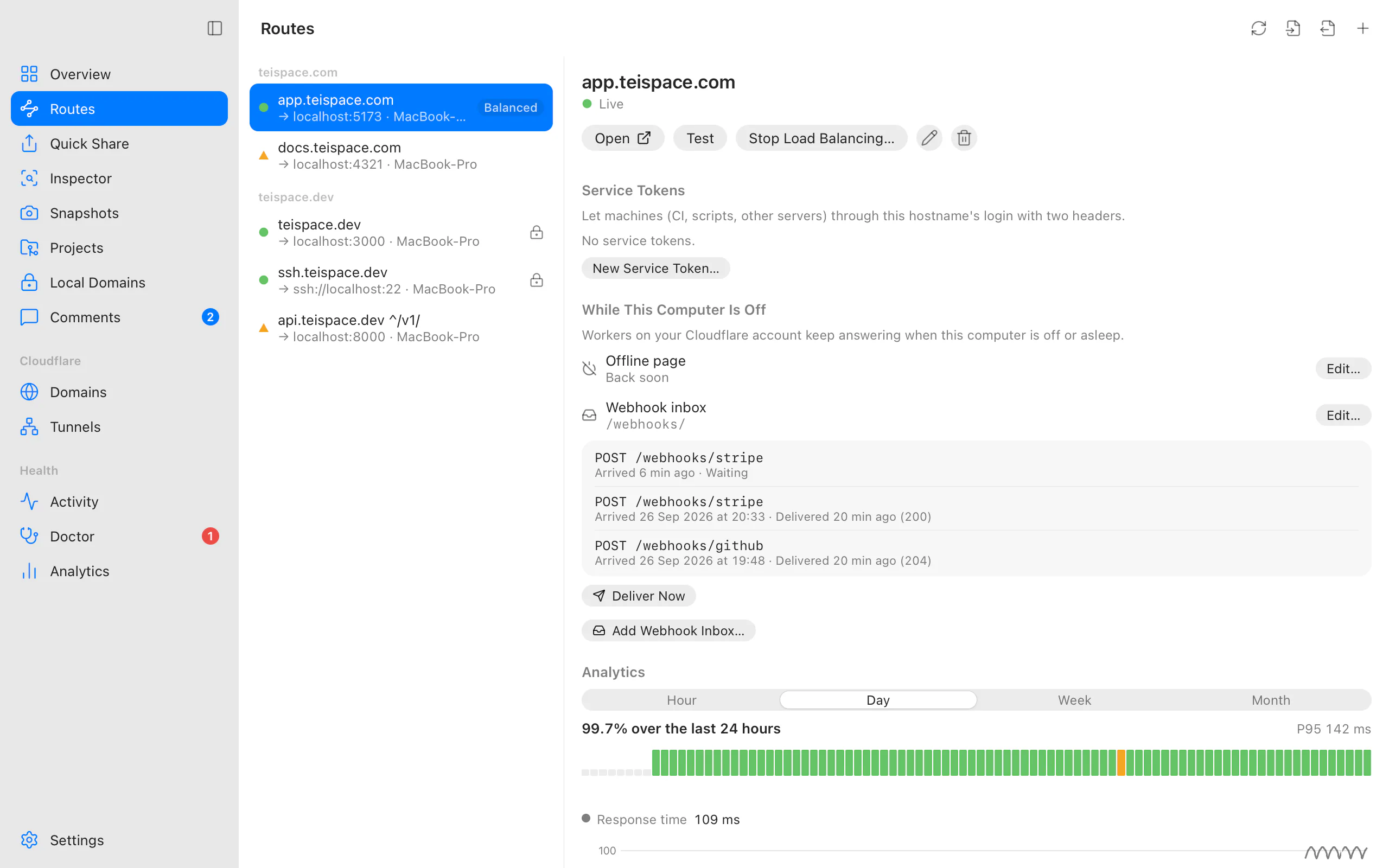
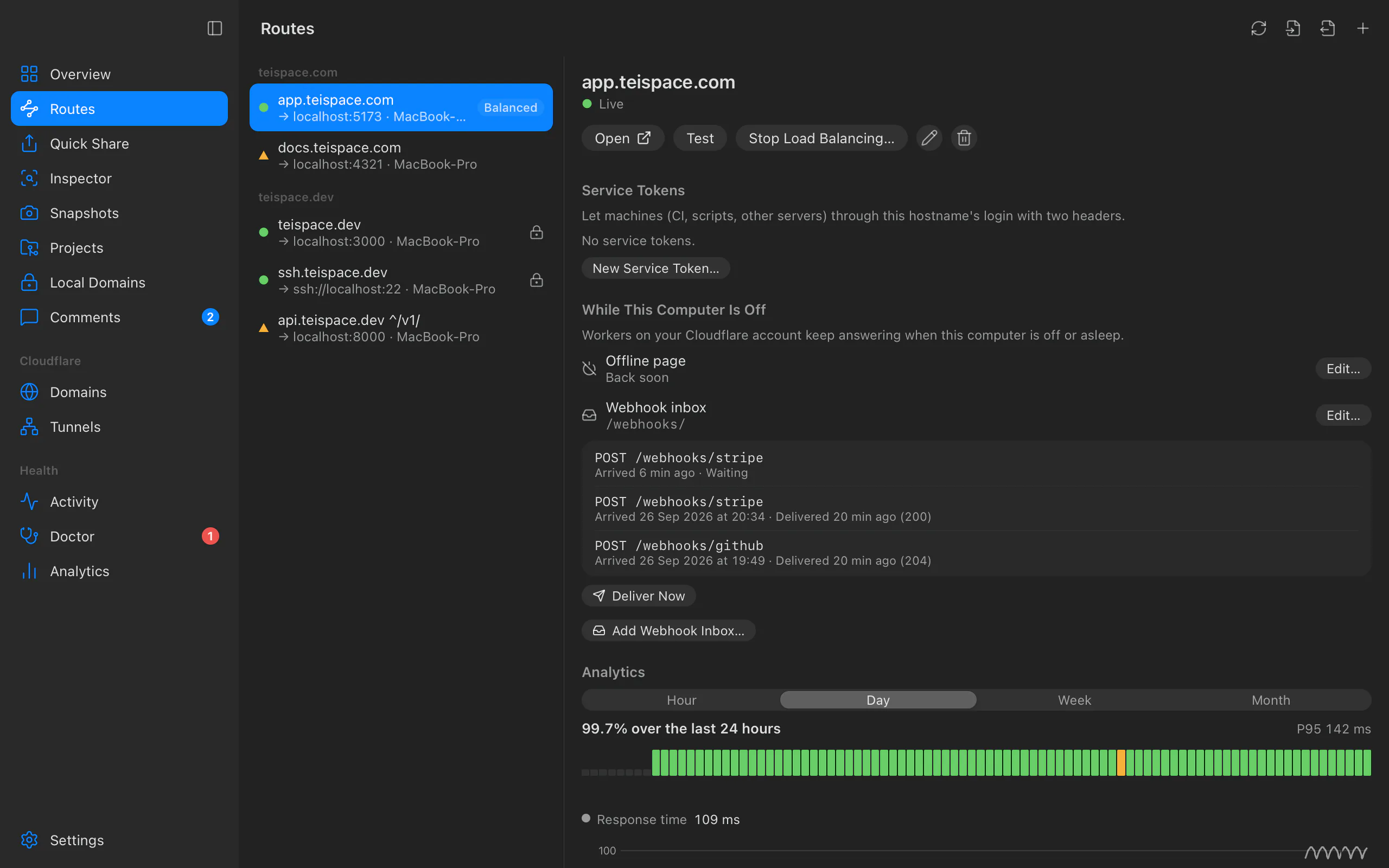
Open the route in Routes. Under While This Computer Is Off, choose Add Webhook Inbox….
In Webhook Inbox for hooks.yourhost.com, set:
- Path: webhooks to this path and below, for example
/webhooks/or/api/stripe. It must start with/and have no*,?or spaces. - Keep up to 500 webhooks for 7 days: 1 to 1,000 webhooks, kept 1 to 30 days.
- Keep only signed webhooks: Keep every webhook, GitHub, Stripe or Standard Webhooks (Svix, Clerk, Resend…). See below.
Choose Review, read the plan, and choose Apply.
The route then lists the inbox ("Webhooks to /webhooks/") with each webhook, when it arrived, and whether it's Waiting or Delivered (with the status your app answered). Deliver Now delivers waiting ones at once.
From the terminal
teitunnel inbox add hooks.yourhost.com /webhooks/ --max 500 --days 7
teitunnel inbox ls                                   # offline pages and inboxes
teitunnel inbox items hooks.yourhost.com /webhooks/  # recent webhooks, arrived and delivered
teitunnel inbox deliver                              # deliver waiting webhooks now
teitunnel inbox rm hooks.yourhost.com /webhooks/| Command | What it does |
|---|---|
inbox add HOSTNAME PATH | Keep webhooks to a path while this computer is off. --max (default 500, up to 1,000), --days (default 7, up to 30), --verify github|stripe|standard. |
inbox rm HOSTNAME PATH | Remove an inbox. Webhooks still waiting stay in the database until their retention ends. |
inbox ls | Offline pages and inboxes on this computer's records. --json. |
inbox items HOSTNAME PATH | An inbox's recent webhooks. --json. |
inbox secret HOSTNAME PROVIDER | Save a signing secret in the keychain. |
inbox deliver | Deliver waiting webhooks now. |
add and rm show the plan first; -a, --account chooses the account and -y, --yes
applies without asking.
What happens to a webhook
Only POST, PUT, PATCH and DELETE requests are kept. Anything else, such as a
sender's GET verification handshake, always goes straight through.
| Situation | What the inbox does | The sender gets |
|---|---|---|
| This computer is on, nothing waiting | Passes it on to your app, unchanged | Your app's answer |
| This computer is off (Cloudflare can't reach the tunnel, 530) | Stores it | 202 Accepted |
| The app doesn't answer (cloudflared can't reach it, 502) | Stores it | 202 Accepted |
| Earlier webhooks are still waiting | Stores it behind them, so order is kept | 202 Accepted |
| The inbox is full | Doesn't store it | 503 with Retry-After, so the sender retries later |
| Body larger than 512 KB | Passes it through; while offline it's refused | 413 while offline |
| Signature required and missing or wrong | Doesn't store it | 401 while offline |
Cookies, cf-* headers and forwarding headers are dropped before a webhook is stored.
Webhooks older than the retention are deleted, delivered or not.
Delivery
While the app runs, it delivers waiting webhooks every 30 seconds, oldest first. Each goes from this computer directly to the route's own local service (the one the route points at), with its original method, path, headers and body, plus:
X-Teitunnel-Inbox: the webhook's id in the inbox.X-Teitunnel-Received-At: when it arrived at Cloudflare.
An answer below 500 counts as delivered. A 5xx or no answer stops the round, so later webhooks never overtake it, and it's tried again next time. Redirects aren't followed. While the route is inspected, deliveries go through the inspector and show there with their headers.
On a server
teitunnel up and teitunnel serve don't deliver inboxes by themselves. On a server, run
teitunnel inbox deliver on a timer (a systemd timer or cron job), or keep the app
running.
Signatures and replays
The body and headers are delivered unchanged, so signatures still verify. But senders that sign a timestamp (Stripe, Standard Webhooks) are usually checked with a 5-minute tolerance, and a webhook delivered hours later is older than that. Give your app's check a longer tolerance, or rely on the inbox's own check (below), which runs when the webhook arrives.
Only keep signed webhooks
An inbox can keep only webhooks with a valid signature, so nobody else can fill it with
junk while you're away. It checks GitHub (X-Hub-Signature-256), Stripe
(Stripe-Signature) and Standard Webhooks (Svix, Clerk, Resend and others; timestamps within
5 minutes).
Save the signing secret for the hostname once. The inspector uses the same secret to check signatures. In the app, choose the sender under Keep only signed webhooks, paste the secret and click Save Secret (Review waits for it). In a terminal:
teitunnel inbox secret hooks.yourhost.com stripe     # reads it from standard input
TEITUNNEL_WEBHOOK_SECRET=whsec_… teitunnel inbox secret hooks.yourhost.com stripe
teitunnel inbox add hooks.yourhost.com /webhooks/stripe --verify stripe
The secret is never read from the command line. It's kept in your system's keychain, and Teitunnel sends it to Cloudflare only as a secret of the inbox's Worker: it's never shown again, and never in the plan or Activity.
What happens on Cloudflare
The plan ("Keep webhooks to hooks.yourhost.com/webhooks/ while this computer is off"):
- Create the D1 database
teitunnel-datafor comments and webhooks, only the first time. One database per account holds every inbox and Snapshot comments. - Upload the webhook inbox Worker (named
tt-inbox-and a short hash). - Run it for
hooks.yourhost.com/webhooks/*"(fails open past the free daily requests)".
Removing an inbox stops the Worker route and deletes the Worker. Undo in Activity reverses either change. Undoing the removal of a verifying inbox brings the Worker back without its secret: add the inbox again to restore signature checks. Removing a hostname's last route removes its inboxes too.
The inbox and an offline page can share a hostname: the more specific Worker route (the inbox's path) wins for its path. Teitunnel never takes over a pattern another Worker already runs on.
Limits and costs
| Limit | |
|---|---|
| Webhooks waiting per inbox | 1 to 1,000 (500 by default) |
| Retention | 1 to 30 days (7 by default) |
| Body size kept | 512 KB |
| Worker requests | Every request to the inbox's path; 100,000 free a day per account, then the route fails open |
| D1 (free) | 5 million rows read and 100,000 written a day; 5 GB |
Past the free Worker requests, the route fails open: webhooks go straight to your tunnel as if there were no inbox, and are only kept again after 00:00 UTC.
Permissions
Account · Workers Scripts · Edit, Zone · Workers Routes · Edit on the route's domain, and Account · D1 · Edit. If one is missing, Teitunnel shows what to add and continues when you're back.
Troubleshooting
Related
Last updated on
Offline page
Show your own page instead of Cloudflare's error 1033 when the computer serving a route is off or asleep, with a small Worker on your own Cloudflare account.
Require a login
Protect a Cloudflare Tunnel route with a login using Cloudflare Access: a one-time code by email, or GitHub or Google sign-in, for the people, email domains or GitHub teams you list, set up in one step.