Guides
AI agents (MCP)
Let Claude Code, Cursor, VS Code, Codex, Windsurf, Zed, Claude Desktop, Gemini CLI, Copilot CLI, opencode, Kiro, LM Studio or Junie share your dev server, manage Cloudflare Tunnel routes, debug webhooks and fix problems through Teitunnel's MCP server, with your approval for every change.
Teitunnel has a built-in MCP server. Your AI tool brings the model; Teitunnel gives it the same abilities you have in the app: put a local service online, add routes on your domains, find out why a route is down, read connector logs, wait for a webhook and replay it. Every change goes through the same reviewed plans as the app, waits for your approval unless you say otherwise, and shows up in Activity with the tool's name. Secrets never reach the agent.
Use it when you already work with an agent in your editor or terminal and want it to handle "give me a link to this", "why is staging down" or "debug this webhook" end to end.
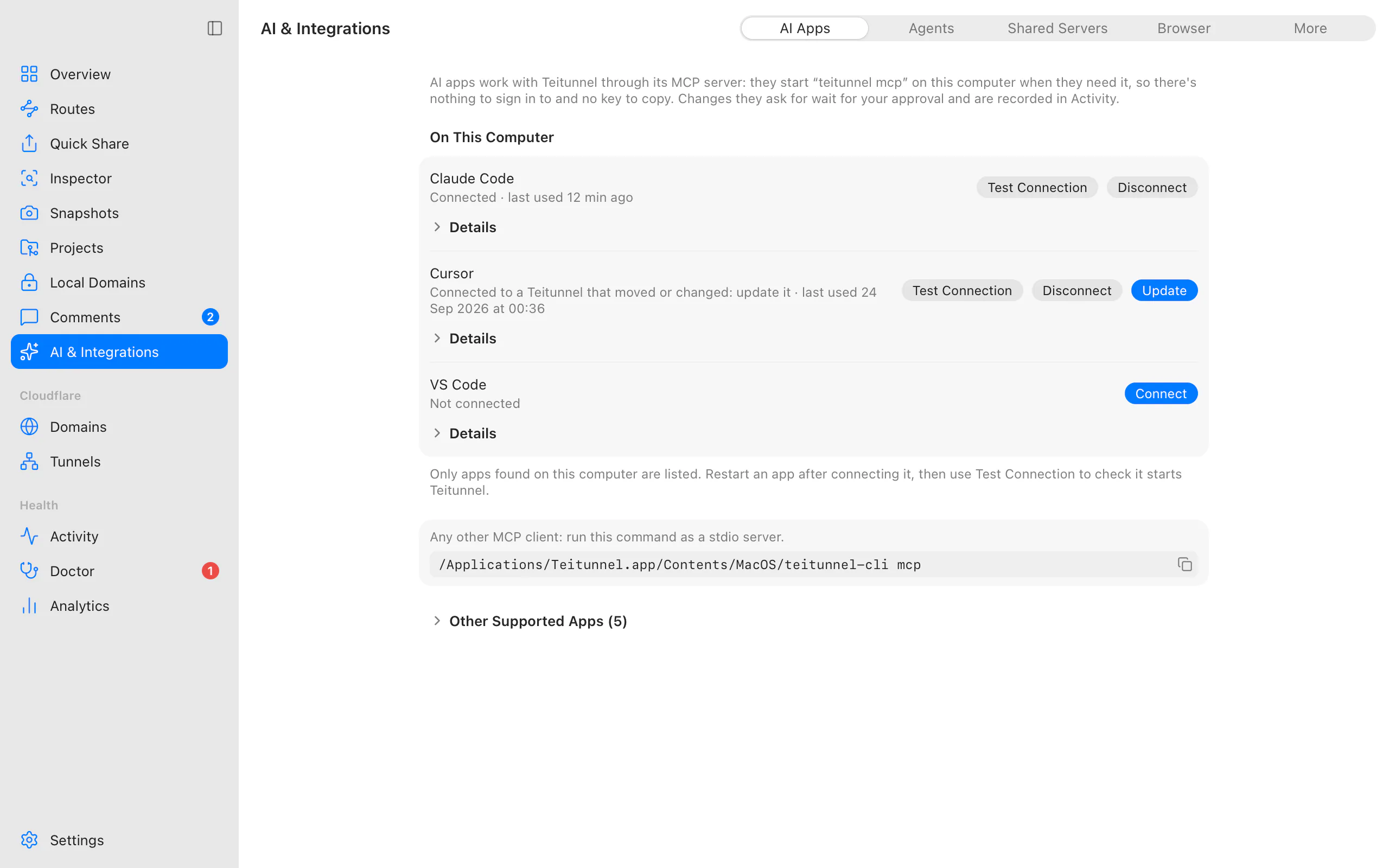
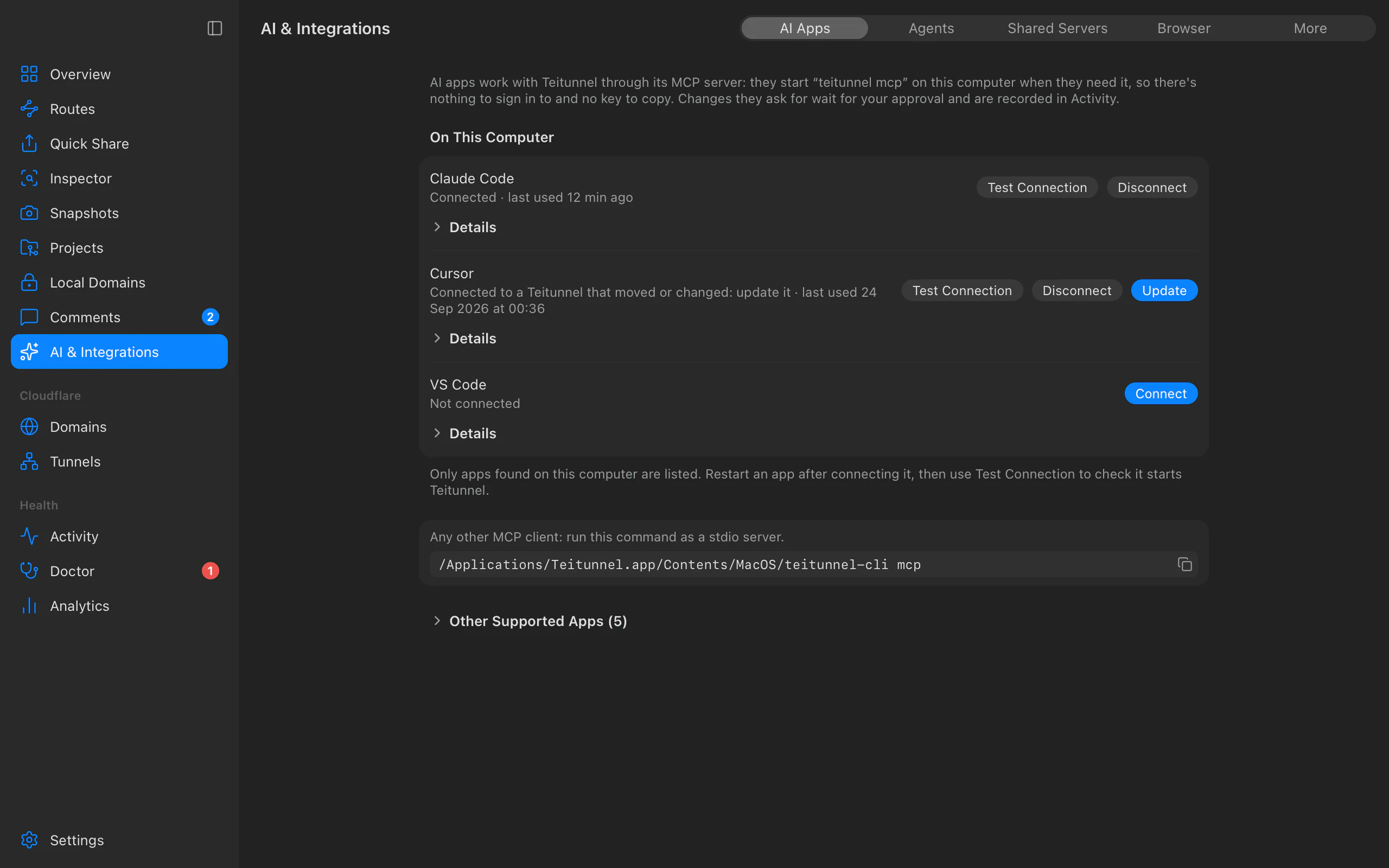
Connect your AI tool
In the app: open AI & Integrations ▸ AI Apps. It lists the AI apps installed on this computer, found by their app or program (a settings folder left behind after uninstalling doesn't count), and says where each one stands:
| It says | Meaning | What to do |
|---|---|---|
| Connected · last used 12 min ago | Teitunnel is in its settings, and an agent from it used Teitunnel then. | Nothing. |
| Connected · not used yet | Teitunnel is in its settings, but no session has started it while the app was open. | Restart the app, ask it something, or choose Test Connection. |
| Connected to a Teitunnel that moved or changed | Its entry starts a teitunnel that isn't there any more (Teitunnel was moved or reinstalled) or with other options. | Update. |
| Not connected | Installed, without Teitunnel. | Connect, then restart the app. |
| Teitunnel is still in its settings, but the app isn't installed any more | Left over from an app you removed. | Remove. |
| Its settings file can't be read | The file isn't valid JSON or TOML; Teitunnel won't touch it. | Fix the file, or add the entry by hand. |
Test Connection starts the MCP server exactly as that app's settings say, does the MCP handshake and lists its tools, then stops it: Works: teitunnel 0.4.1, 41 tools, answered in 180 ms, or why not (the program is missing, it stopped with an error, it didn't answer). Details shows the settings file (with Show in Finder), the command it starts and where the app was found. Apps that aren't installed are under Other Supported Apps, each with the entry to paste by hand, and any other MCP client can run the command shown.
Nothing needs a sign-in or a key: the AI app starts teitunnel mcp on this computer, which
talks to the Teitunnel app there. Last used comes from the app itself: it records each
agent session while it's open (never the conversation).
From the terminal:
teitunnel mcp install claude-code     # or: claude-desktop, cursor, vscode, codex, windsurf,
                                      #     zed, gemini-cli, copilot-cli, opencode, kiro,
                                      #     lm-studio, junie
That adds a teitunnel entry to the tool's MCP configuration and leaves everything else in
the file as it was, comments included. The previous file is kept next to it as
<file>.teitunnel-backup. Restart the tool, or reload its MCP servers, and ask it something
like "Share my dev server".
teitunnel mcp status                  # which tools are installed and connected (--json)
teitunnel mcp config cursor           # print the entry to add by hand
teitunnel mcp uninstall cursor        # remove it again (only Teitunnel's entry)
teitunnel mcp install cursor --mode read-only| Tool | File Teitunnel edits |
|---|---|
| Claude Code | ~/.claude.json (user scope, mcpServers), or under CLAUDE_CONFIG_DIR |
| Claude Desktop | ~/Library/Application Support/Claude/claude_desktop_config.json · Windows: %APPDATA%\Claude\claude_desktop_config.json (from the Microsoft Store: the same file under %LOCALAPPDATA%\Packages\Claude_pzs8sxrjxfjjc\LocalCache\Roaming) · Linux: ~/.config/Claude/claude_desktop_config.json |
| Cursor | ~/.cursor/mcp.json (the app and cursor-agent) |
| VS Code (Copilot) | the user mcp.json next to settings.json (servers): ~/Library/Application Support/Code/User/mcp.json, %APPDATA%\Code\User\mcp.json, ~/.config/Code/User/mcp.json |
| Codex | ~/.codex/config.toml (or under CODEX_HOME), [mcp_servers.teitunnel] |
| Windsurf | ~/.codeium/windsurf/mcp_config.json |
| Zed | ~/.config/zed/settings.json (context_servers) · Windows: %APPDATA%\Zed\settings.json |
| Gemini CLI | ~/.gemini/settings.json |
| GitHub Copilot CLI | ~/.copilot/mcp-config.json (or under COPILOT_HOME), a local server with every tool |
| opencode | ~/.config/opencode/opencode.json (or opencode.jsonc), mcp |
Kiro (IDE and kiro-cli) | ~/.kiro/settings/mcp.json |
| LM Studio | ~/.lmstudio/mcp.json |
| Junie | ~/.junie/mcp/mcp.json |
The entry runs this teitunnel executable (its real path) with mcp and, if you chose
one, --mode. Any other MCP client works too: run teitunnel mcp as a stdio server.
What it can do
| Tool | Does |
|---|---|
share_port | Puts a local service online: a random trycloudflare.com link, or a hostname on your domain, optionally behind a login. Ends when stopped, when it expires, or when the session ends. |
share_folder | Puts a folder of files online (a random link or a hostname on your domain), without hidden files, .env files, keys, .git or node_modules. |
stop_share, list_shares | Every share, whoever started it (the app, a terminal, an agent). |
pause_share, resume_share, schedule_share | Pause a share on your domain (the address stays, visitors see a paused page), serve it again, or run it only during set hours (Sharing). |
list_local_services | Listening ports with what they are (Vite, Next.js, Django, Docker…) and their project. |
list_routes, list_domains, list_tunnels | Routes with their live status, domains, tunnels and the machines running them. |
plan_change | Plans any change: add, edit or remove a route, require a login, load balance, private networks, create or delete a tunnel, import routes. Nothing changes. |
apply_plan | Applies a reviewed plan by its id and fingerprint, with progress, then checks the routes. |
verify_route | Checks a hostname end to end and says where it breaks. |
undo_last | Plans the reverse of the latest change. |
get_protection, protect_hostname | A hostname's rules at Cloudflare's edge (bots, AI crawlers, rate limit, headers) and quotas; plans a change, applied with apply_plan (Edge protection). |
service_token_list, service_token_create, service_token_revoke | Service tokens that let machines through a login. A new token's secret is returned once, after your approval, marked sensitive. |
get_offline_page_and_inboxes, set_offline_page, set_webhook_inbox | A hostname's offline page and webhook inboxes: what it has, and setting or removing either after your approval of the plan. A verifying inbox uses the signing secret already saved in the inspector. |
list_reservations, reserve_hostname, release_hostname | Hostnames reserved on the account and who holds them; reserve one (optionally until a date) or give it up (Teams). |
comments_list, comments_reply, comments_resolve | Reviewers' comments on shares and Snapshots (Comments); reviewers' email addresses are never included. |
doctor, fix_issue | The Doctor's issues and their fixes (Doctor checks). |
logs_tail, remote_logs, connector_status | This machine's connector logs (per route), another machine's live logs, connector health. |
list_local_domains, add_local_domain, remove_local_domain | Local HTTPS domains such as https://shop.test for a dev server, on this computer only. Served by the app while it runs, otherwise by the MCP server until its session ends; trusting the certificate authority is left to you (it asks for your password). |
route_traffic | Who uses a route or share and how: requests over time and per second, answers, the 5xx share, response times, top paths, countries, browsers and bots by kind, from the inspector when it's in front of it and otherwise from Cloudflare's analytics (Analytics). |
route_health | Whether each route is up, its uptime over a day, week and month, response times, the outage going on and recent incidents, from the checks the app runs every minute (Analytics). |
export_config, import_scan | config.yml, Docker Compose or Terraform; existing cloudflared setups. |
accounts, recent_activity | Connected accounts and what they can do (never their credentials); recent changes and who made them. |
traffic_list, traffic_get, traffic_replay, wait_for_request, traffic_stats, traffic_export | Requests the inspector captured on the server's shares and its recent history: list, inspect, replay, wait for the next one (for webhooks; progress is reported while waiting), numbers, cURL/HAR/Markdown. |
traffic_openapi | An OpenAPI 3.1 description of the API the captured requests show (OpenAPI from traffic). |
expose_mcp_server | Puts an MCP server running on this machine online at a hostname on your domain for remote AI clients: checks it answers MCP, keeps streams alive, requires a bearer token or, for claude.ai and ChatGPT, an OAuth sign-in you approve in Teitunnel, and returns configurations for Claude Code, Cursor and VS Code. The agent never sees the token (you get it with teitunnel token <hostname>). |
inspection_settings, configure_inspection | What the inspector does for the server's shares, and changing it to test how an app copes: mock responses (always, or only while the service is down), a share of requests failing (a status, a dropped connection, a delay, a timeout), a slow network (3G, 4G, satellite), header rules and CORS, watched paths, idle stop. On this computer only; your approval first in ask mode. |
It also offers resources your tool can attach as context (teitunnel://routes,
teitunnel://shares, teitunnel://domains, teitunnel://issues, teitunnel://activity,
teitunnel://route/{hostname}, teitunnel://logs/{tunnel}) and prompts: Put my dev
server online, Debug a failing webhook, Why is my route down?, Move my routes to a
server and Test how my app copes.
Modes
The server runs in one of three modes:
| Mode | In the app | What the agent can do |
|---|---|---|
ask (default) | Asks first | Everything, but every change waits for your yes. |
read-only | Read only | Look only. Tools that change something aren't offered at all. |
full | Full access | Changes apply without asking, still only through plans. Records Teitunnel didn't create are never replaced or deleted without an explicit confirmation. |
Teitunnel reads the mode from mcp.json in its data folder ({ "mode": "read-only" }, for
every tool), then the environment variable TEITUNNEL_MCP_MODE, then the --mode flag; a
later one wins. teitunnel mcp install <tool> --mode read-only writes the flag into that
tool's entry, so it sets the mode per tool.
mcp.json holds the server's other settings too; each takes effect the next time an AI tool
starts Teitunnel's MCP server:
| Setting | Default | What it does |
|---|---|---|
mode | "ask" | read-only, ask or full, as above. |
approveInApp | true | In ask mode, a change needs your answer in Teitunnel or in your AI tool; the agent saying you agreed isn't enough. See Approvals. |
allowSecrets | false | Show agents credentials in captured requests and logs. |
oauth.dynamicRegistration | true | MCP servers you share with OAuth accept apps that register themselves. |
oauth.maxGrantDays | 90 | How many days a connection to a shared MCP server lasts before you approve it again (1 to 365). |
Approvals in the app
In ask mode, a change is approved by you, in this order of preference:
- The Teitunnel app, when it's running. The agent's
teitunnel mcpasks the app over its local control connection, and the app shows a native dialog: "Allow Claude Code to make this change?" with the plan's steps. There's no Always Allow for agents. An agent's own "confirmed" never counts while you can be asked, and no answer within about three minutes counts as no. The app shows one question at a time: while one waits, the agent is told to try again after you answer it, not that you said no. - Your AI tool, if it can show a question (MCP elicitation; on protocol 2026-07-28 the tool call comes back asking for your answer, and the tool calls again with it).
- Nobody can ask you (the app isn't running and the tool can't show a question): the change doesn't happen, and the agent is told to have you open Teitunnel and try again. Agents read web pages, issues and captured requests, and text there can try to talk them into things, so an agent saying you agreed isn't enough.
If you'd rather approve in the conversation when nobody can ask you, set "approveInApp": false in mcp.json (or TEITUNNEL_MCP_APPROVE_IN_APP=0). The agent then gets
needsApproval, has to show you the plan, and can go ahead by calling again after you agree.
A person's "no" always wins. Settings ▸ General ▸ Connected Agents lists the agents using Teitunnel right now, with their mode ("Asks first", "Read only", "Full access") and any change waiting for your answer. The app doesn't host an MCP endpoint itself, so nothing new listens on a network port.
Secrets never reach the agent
The agent never sees API tokens, OAuth tokens, tunnel tokens, anything in the keychain, or
reviewers' email addresses. Credentials in captured requests (Authorization, Cookie,
Set-Cookie, webhook signatures and other secret headers) are masked, and tokens in logs
are redacted. Bearer tokens for shared AI and MCP servers appear as <TOKEN>. Only
teitunnel mcp --allow-secrets (or TEITUNNEL_MCP_ALLOW_SECRETS=1) shows captured
credentials, and only to that server. The one exception is a service token an agent
creates: its secret is returned once, after you approved the change, marked sensitive.
What anyone could have written (captured requests, review comments, logs, pages checked by
verify_route) comes back marked untrusted: true and fenced, and the agent is told to read
it as data, never as instructions.
Every Cloudflare change an agent makes is in Activity, marked with its name, and
undo_last (or you, in the app) can reverse it. Calls are rate limited (240 reads, 30
changes and 12 destructive changes a minute per server), answers are bounded and paged, and
long waits can be cancelled.
Examples
Share a dev server. "Put my Vite app online for my phone." The agent finds the port
with list_local_services, calls share_port, you approve, and it gives you the link.
On your domain, with a login. "Share port 8080 at demo.yourhost.com, only for
@yourhost.com." A temporary route with a Cloudflare Access login, removed when the session
ends. For a permanent route the agent plans an addRoute change instead.
Debug a webhook. "Stripe webhooks to my app fail." The agent shares the port, asks
you to send a test event, waits for it with wait_for_request, reads the request and your
app's answer, fixes the handler, and replays the request until it answers 200.
Why is my route down? The agent runs verify_route (DNS, edge, tunnel, service),
doctor, and the route's logs, then fixes it with fix_issue or a plan.
Act on review comments. "Address the comments on the preview." comments_list,
then code changes, then comments_reply and comments_resolve, each approved by you.
Move to a server. export_config as Docker Compose, with instructions for the token.
A server over HTTP
teitunnel serve also serves MCP at /mcp (Streamable HTTP) for agents elsewhere. It uses
the server's API keys:
teitunnel api-key create my-agent
teitunnel serve --mcp-mode ask        # read-only, ask (default) or full; --no-mcp turns it off
Configure the client with the URL http://127.0.0.1:8765/mcp (or your HTTPS address in
front of it) and the header Authorization: Bearer ttk_…. Requests from browsers (with an
Origin header) are refused unless you allow that origin with --mcp-allow-origin, and
changes are recorded with the key's name. Over HTTP, approvals in ask mode go through
your tool's questions; a tool that can't ask can make changes only in full mode, or with
"approveInApp": false in the server's mcp.json (then through the conversation). Tools on
protocol 2026-07-28 don't keep a session open, so shares an agent starts over HTTP last 60
minutes unless it asks for another time. See the Server API.
Agent Skill
Tools that support Agent Skills
can load Teitunnel's: /skills/teitunnel/SKILL.md. It tells
the agent when to reach for Teitunnel and the rules for working with it: show a plan before
applying it, never pass confirmed: true on its own, never ask for tokens, and use a route
rather than a share for anything that should stay online.
Tell your project's agent
Add this to your repository's AGENTS.md (or CLAUDE.md) so agents working on it use
Teitunnel for anything that needs a public URL:
## Sharing and tunnels
This project uses Teitunnel (MCP server `teitunnel`) for public URLs.
- To show the dev server or receive webhooks: `share_port` (port 3000); for webhooks,
  `wait_for_request` then `traffic_get`/`traffic_replay`.
- Routes on our domain change only through `plan_change` → show me the plan → `apply_plan`.
- Never ask for or paste Cloudflare tokens.
Troubleshooting
Related
Last updated on
Browser extension
Share the local page you're on at a public URL, and see or stop your shares, from Chrome, Edge, Brave, Arc, Vivaldi, Chromium or Firefox, through the Teitunnel app.
Servers and containers
Run Cloudflare Tunnel routes on a VPS, AWS EC2, Azure, Google Cloud, Docker or Kubernetes with teitunnel, as a sandboxed systemd service, with a web dashboard and an API.