Guides
Project files
Declare a project's routes, shares, Snapshots and local domains in a teitunnel.yml checked into its repository, and bring them up with teitunnel up or one click in the app: previewed first, idempotent, never holding a secret.
A project file is a teitunnel.yml at the root of a repository. It says what the
project needs from Teitunnel: its routes, the shares to start while you work on it, the
Snapshots it publishes and its local domains. Check it into git and everyone on the team
gets the same setup with one command, each with their own addresses.
Applying it goes through the same plan as every other change: you see exactly what will change in Cloudflare and on this computer before anything happens. Applying it again changes nothing ("Nothing to change."), so it's safe to run every time you start work, and in CI.
An example
# yaml-language-server: $schema=https://teitunnel.teispace.com/schema/teitunnel.v1.json
version: 1
project: shop            # default: the name in package.json, Cargo.toml… or the folder's
account: Teispace        # only needed when several accounts are connected

routes:
  - hostname: shop.yourhost.com
    origin: 3000
  - hostname: api.yourhost.com
    origin: http://localhost:4000
    path: ^/v1
    login: [team@yourhost.com, "@yourhost.com"]   # require a Cloudflare Access login
    originRequest:
      httpHostHeader: localhost:4000
      connectTimeout: 10

shares:
  - port: 5173
    hostname: "{branch}-{project}.yourhost.com"  # feat-login-shop.yourhost.com
    expires: 2h
    hostHeader: localhost:5173
  - port: 8080                                   # a random trycloudflare.com address

snapshots:
  - name: docs
    source: { folder: dist }                     # or { build: . } to build first
    hostname: docs.yourhost.com                  # without it: your workers.dev address
    spa: true
    password: { env: DOCS_PASSWORD }             # never the password itself
    expires: 30d

localDomains:
  - name: shop.localhost
    port: 3000
    wildcard: true
Start one
cd ~/code/shop
teitunnel project init     # writes teitunnel.yml from what this machine runs for the project
teitunnel project check    # every problem, with its line and column (no account needed)
init fills the file from the routes and shares this machine already runs for the project;
--force replaces an existing file, -a picks the account. check needs no Cloudflare
account at all, so it works in a pre-commit hook or a CI lint step.
Apply it
From the terminal
In the repository, or any folder below it (Teitunnel looks in this folder and the ones above it, up to the repository's root):
teitunnel project diff     # what applying would change; nothing changes
teitunnel up               # apply it (after showing the plan), then run the tunnels and shares
teitunnel project apply    # the same, without running this machine's other tunnels
teitunnel project down     # stop the project's shares
teitunnel project down --remove-routes   # also remove the routes it created
teitunnel project list     # the projects this machine knows
up and project apply show one combined plan (each route's steps, the Snapshots to
publish, the shares to start) and ask before applying. Shares run as long as the command
does and stop with Ctrl-C.
| Flag | Meaning |
|---|---|
-f, --file PATH | Another project file, or a folder with one. |
-a, --account | The account; default: the file's account. |
-y, --yes | Apply without asking, for scripts. |
--replace | Also allow replacing DNS records Teitunnel didn't create. |
--strict | Don't start a share when the exposure check finds a leak. |
--json | With diff and list: JSON output. |
--no-project | With up: ignore the file in this folder. |
In the app
- Open Projects in the sidebar and choose Open Project… (the folder with the
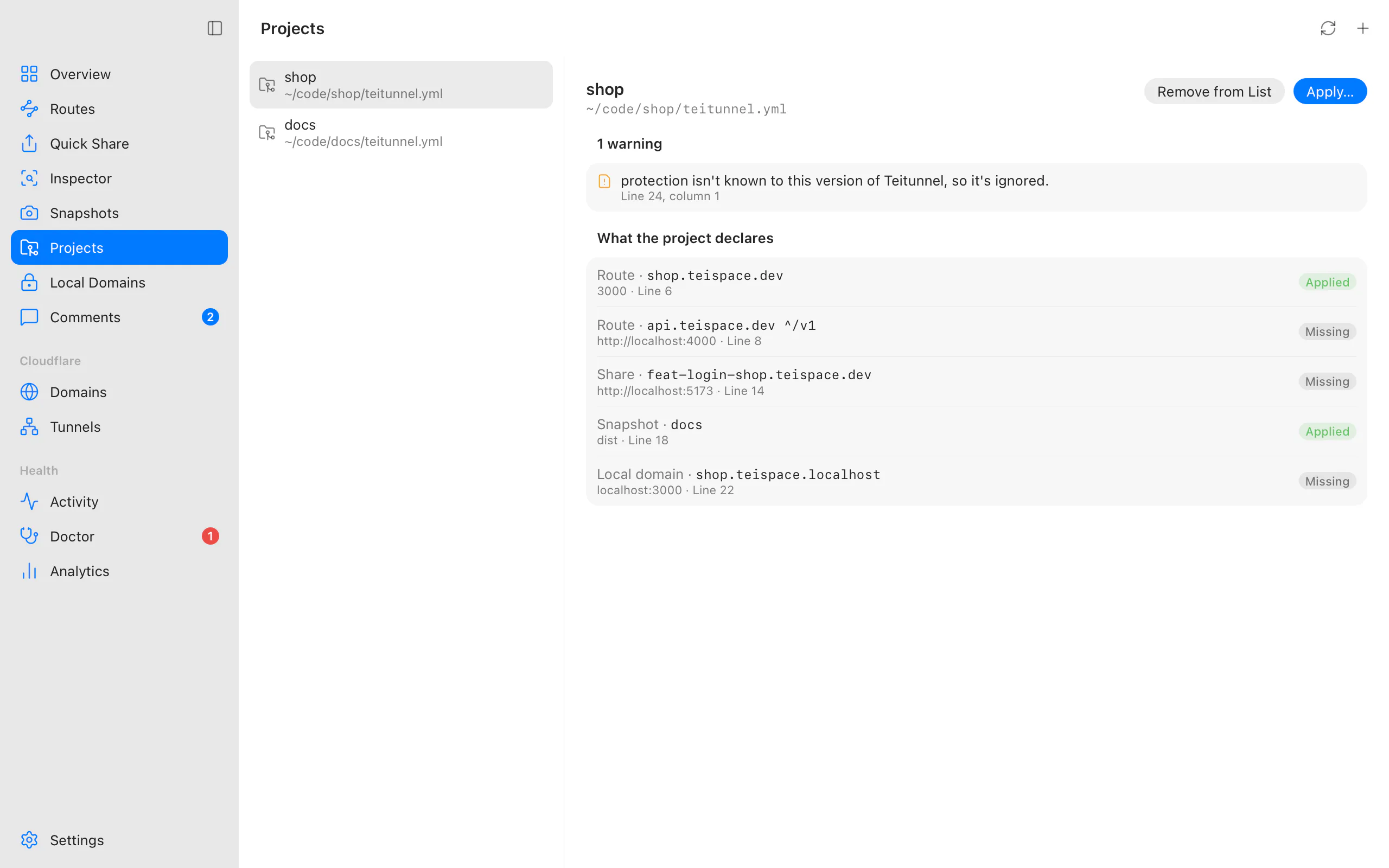
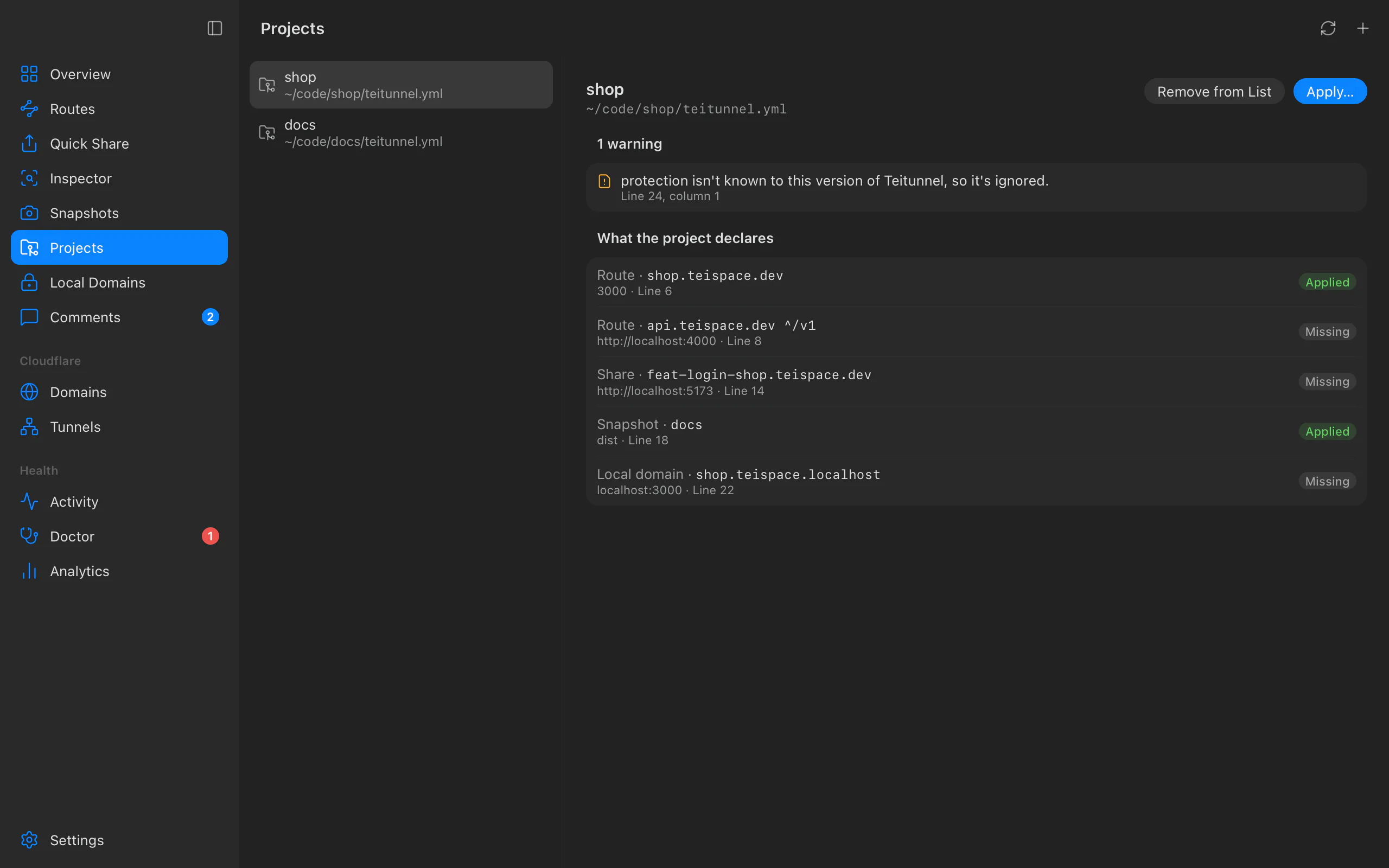
teitunnel.yml), or drop the folder on the window. - What the project declares lists each route, share, Snapshot and local domain as Applied, Differs or Missing, and the file's problems with their line and column ("2 problems in teitunnel.yml").
- Apply… opens Apply shop: exactly what changes in Cloudflare and on this computer, grouped under Routes, Snapshots, Shares and Local domains. Nothing happens until you choose Apply.
The app watches the file. When you edit it, a banner ("teitunnel.yml changed") offers Review Changes. Shares started from the app run until you stop them or quit Teitunnel.
What happens on Cloudflare
- Routes are added or updated through the normal plan: DNS record, tunnel
configuration, and an Access login when
loginis set. Each route is planned again just before it's applied, and refused if its steps no longer match what you saw ("Cloudflare changed since the plan was shown. Review the plan again."). If one fails, the ones after it aren't applied ("Stopped at api.yourhost.com."). - Snapshots are published the first time and get a new version when their files changed ("Publish a new version of Snapshot docs if its files changed").
- Shares on a hostname are temporary routes, removed when the share stops. Shares without one get a random trycloudflare.com address.
- Local domains stay on this computer; nothing changes in Cloudflare.
project down --remove-routes removes only the routes applying the project created. A route
that was already there before stays, and DNS records Teitunnel didn't create are never
deleted. Every change is recorded in Activity and can be undone there.
Keys
| Key | What it is |
|---|---|
version | Required. Always 1 for this format. |
project | The project's name, for the {project} placeholder. Default: the name in package.json, Cargo.toml, pyproject.toml, composer.json or go.mod, else the folder's name. |
account | The Cloudflare account (name or id), when several are connected. |
routes[] | Permanent routes (below). |
shares[] | Shares that run while teitunnel up or the app runs them (below). |
snapshots[] | Static copies published to your account (below). |
localDomains[] | Local HTTPS names for ports on this machine (below). |
routes[]
| Key | |
|---|---|
hostname | Required. A hostname on one of the account's domains; placeholders allowed. |
origin | Required. A port (3000), host:port, or a URL (http, https, tcp, ssh, rdp, smb). |
path | Only requests whose path matches this regex, e.g. ^/api. |
tunnel | One of this machine's tunnels, by name. Default: the default tunnel. An existing route stays on its tunnel; tunnel only picks where a new route goes. |
login | Require a Cloudflare Access login: an email address, @domain, github:org or github:org/team, or a list of them. |
signIn | How people log in: github or google (the account's login method of that kind), or any (the default; needs login). |
skipLogin | Paths that skip the login, e.g. [/webhooks], for webhook senders (needs login; at most 10). |
originRequest | cloudflared's origin settings: httpHostHeader, originServerName, matchSNItoHost, noTLSVerify, caPool, http2Origin, disableChunkedEncoding, connectTimeout, tlsTimeout, tcpKeepAlive, keepAliveTimeout, keepAliveConnections, noHappyEyeballs, proxyType. |
shares[]
| Key | |
|---|---|
port or url | Required, one of them: a port on this machine, or the service's URL. |
hostname | A hostname on one of your domains (a temporary route). Without it, a random trycloudflare.com address. |
expires | Ends by itself after 90s, 30m, 2h or 7d (a bare number is minutes; at most 90 days). |
hostHeader | auto (default: dev servers that need their own address get it), false to pass the visitor's through, or a value such as localhost:5173. |
login | Require a login; needs a hostname. |
inspect | Record its traffic in the inspector. Default true. |
snapshots[]
| Key | |
|---|---|
name | Required. Up to 40 characters. |
source | Required. { folder: PATH } published as it is, or { build: PATH } built first; relative to teitunnel.yml and inside the project. |
hostname | A hostname on one of your domains. Default: the account's workers.dev address. |
spa | Serve index.html for unknown paths. |
password | A secret reference (below). |
login | Require a login; needs a hostname. |
expires | Delete it after this long, in whole days, e.g. 30d. |
localDomains[]
| Key | |
|---|---|
name | Required. name.localhost, name.test or name.local. |
port | Required. The port on this machine. |
wildcard | Subdomains (*.shop.localhost) go to the same port. |
Keys this version of Teitunnel doesn't know (such as protection, reserved for a later
version) are reported as warnings ("… isn't known to this version of Teitunnel, so it's
ignored.") and skipped, so a file written for a newer version still applies what this one
understands. A file for another version needs a newer Teitunnel.
Placeholders
Hostnames can use {branch} (the git branch, read from .git/HEAD; worktrees work, no git
process runs), {user} (your login name) and {project}. Each becomes a DNS label:
feature/Login_Fix becomes feature-login-fix. Everyone on the team gets their own
address from the same file. Outside a git repository {branch} has no value, and the file
says so ("The branch placeholder has no value here (the branch needs a git repository).").
Editor autocompletion
The first line, # yaml-language-server: $schema=https://teitunnel.teispace.com/schema/teitunnel.v1.json,
gives editors with YAML language support (VS Code's YAML extension, JetBrains IDEs, Zed,
Neovim with yaml-language-server) completion and checks for every key. The schema is
published at /schema/teitunnel.v1.json and kept in sync with
the parser by a test.
Never a secret
A project file is checked into git, so it can't hold a secret. A Snapshot's password is a reference:
password: { env: DOCS_PASSWORD }         # an environment variable of whoever applies it
password: { keychain: docs-preview }     # an entry in the system's keychain, Teitunnel's service
Store the keychain entry once, under the service com.teispace.teitunnel with the
reference's name as the account:
security add-generic-password -s com.teispace.teitunnel -a docs-preview -wTeitunnel refuses a file with a literal secret under a key like password, token or
apiKey, and any value that looks like a credential wherever it is (a Cloudflare API token
or key, a tunnel token, a JSON web token, a private key, GitHub, Stripe, Slack or AWS keys),
with the line and column to fix. A Snapshot's password is set when it's first published;
later applies keep it (to change it, use teitunnel snapshot update <name> --password).
Good to know
- Local domains are added to this computer's local domains
(marked as the project's) and served by the app, or by
teitunnel local-domain serve. An existing one keeps its HTTPS and inspection settings. - Before a new route or share makes a service public, the exposure check looks at it for leaks.
- A project file is at most 256 KB.
- For pull request previews, the GitHub Action and GitLab template publish Snapshots and shares without a project file.
Troubleshooting
Related
Last updated on
Edge protection
Challenge or block bots and AI crawlers, rate limit visitors, change headers, bypass Cloudflare's cache, and give machines service tokens: rules Cloudflare enforces for one hostname, planned and undoable like every change.
Previews in CI and teams
Pull request previews on your own Cloudflare domain with the Teitunnel GitHub Action or GitLab CI template, and hostname reservations for teams sharing one account.