Concepts
DNS ownership
Which DNS records Teitunnel may change on its own, how it marks and remembers them, why it asks before touching any other record, --replace and --take-over, reservations for teams sharing an account, and how the Doctor cleans up dangling records safely.
Your domain's DNS is shared with everything else you run: your website, email, verification records, other people's tunnels. A tool that creates records also needs to know which ones it may remove later, and a mistake there takes down something unrelated. So Teitunnel keeps track of exactly which records it created, and treats every other record as yours.
The rule
- Records Teitunnel created are changed and deleted as part of normal changes: removing a route removes its record, deleting a tunnel removes the records it made for it.
- Every other record is never changed or deleted without your explicit confirmation, and never deleted automatically. When a change would replace or delete one, the plan shows the record as it is (type and content) and waits for you to confirm.
- Removing a route whose record Teitunnel didn't create leaves the record in place, and the plan says so: The DNS record for app.yourhost.com wasn't created by Teitunnel, so it's left in place.
The same rule covers the other things Teitunnel creates in your account: logins (Access applications named Teitunnel · app.yourhost.com), edge rules, service tokens and Workers. A login someone else set up on the same hostname is never changed; the plan stops and says to change it in the Cloudflare dashboard.
How Teitunnel knows a record is its own
Two ways, so ownership survives a lost database or a new computer:
-
A comment on the record. Every record Teitunnel writes carries a DNS comment that starts with
teitunnel:, for example:teitunnel:route=3f9a1c07e2b4;by=<user>@<computer>route=is the route's id (derived from its hostname and path), andby=names who made it: the user and computer, or the value ofTEITUNNEL_OWNERwhen it's set (CI jobs use a stable name). You can see these comments in the Cloudflare dashboard's DNS list. -
A local index. Teitunnel also remembers the id of each record it created in its database on this computer, in case the comment is edited away.
A record counts as Teitunnel's if either says so. The index moves with an encrypted backup, and the comments mean a fresh install recognises its records even without one.
Don't add a teitunnel: comment to your own records by hand: Teitunnel would treat them as
its own, and could replace or delete them without asking.
Confirming a change to someone else's record
When you add a route on a hostname that already has a record Teitunnel didn't create (an old
A record for a server, a CNAME to another service), the plan shows it:
app.yourhost.com already has a DNS record (A 203.0.113.4) that Teitunnel didn't create. It will be replaced.
In the app, tick Replace the existing records in the plan before applying. Nothing changes until you do; if you'd rather keep the record, pick another hostname.
From a terminal, the command stops before applying:
$ teitunnel route add app.yourhost.com 3000
! app.yourhost.com already has an A record (203.0.113.4) that Teitunnel didn't create. It will be replaced.
 1. Update tunnel “laptop” to serve 2 routes
 2. Point app.yourhost.com at tunnel “laptop” (was A 203.0.113.4)
 3. Check https://app.yourhost.com works
teitunnel: This needs a confirmation (see above). Pass --replace to allow it.

$ teitunnel route add app.yourhost.com 3000 --replace
--replace works the same on every command that changes Cloudflare (route add,
route remove, project apply, up, tunnel delete…). Even with it, the replaced record
is recorded in Activity with its old value, and if the
change fails, the old record is put back.
Some flows never replace a record at all: a share on your domain refuses a hostname with a record Teitunnel didn't create, and so does the Doctor's Fix Safe Issues.
Other machines and teammates
Several people and machines often share one Cloudflare account. Since each record's comment names who made it, Teitunnel knows when a hostname is held by someone else:
- Another machine's route: the hostname points at another tunnel, through a record another Teitunnel made. Adding the same hostname here would send its visitors to you. The plan says app.yourhost.com is routed by … on another machine. Going ahead takes it over, and their route stops working.
- A reservation (below) that hasn't ended.
Taking a held hostname needs its own confirmation: Take this hostname from whoever holds
it in the app, --take-over in the terminal (without it, the command exits with status
3). Your own routes from earlier runs (the same owner through another tunnel, such as a
previous CI job) count as yours.
Reservations
A reservation claims a hostname for you without routing it yet, so teammates see it's taken: a feature branch's preview name, a demo you'll run on Friday.
-
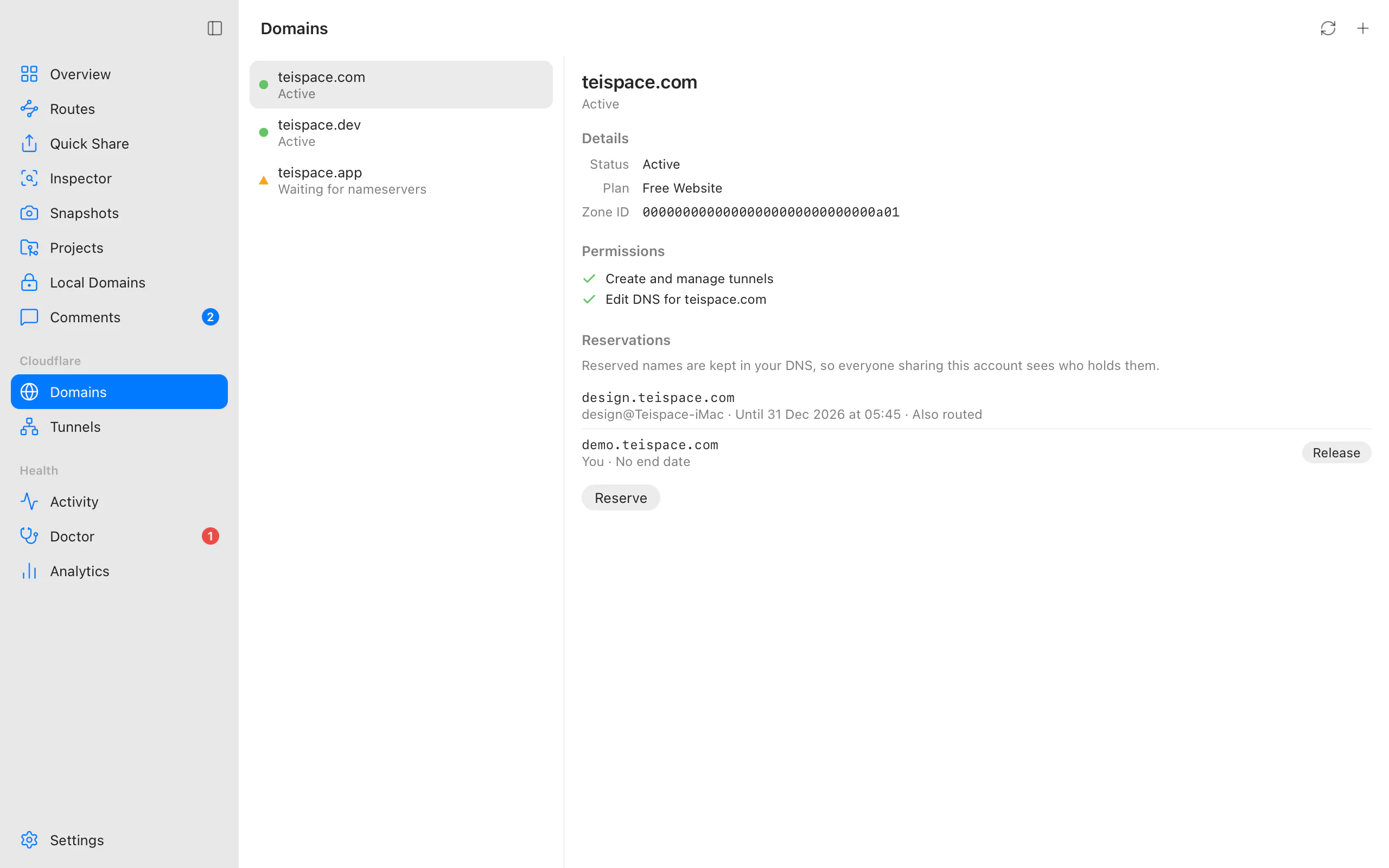
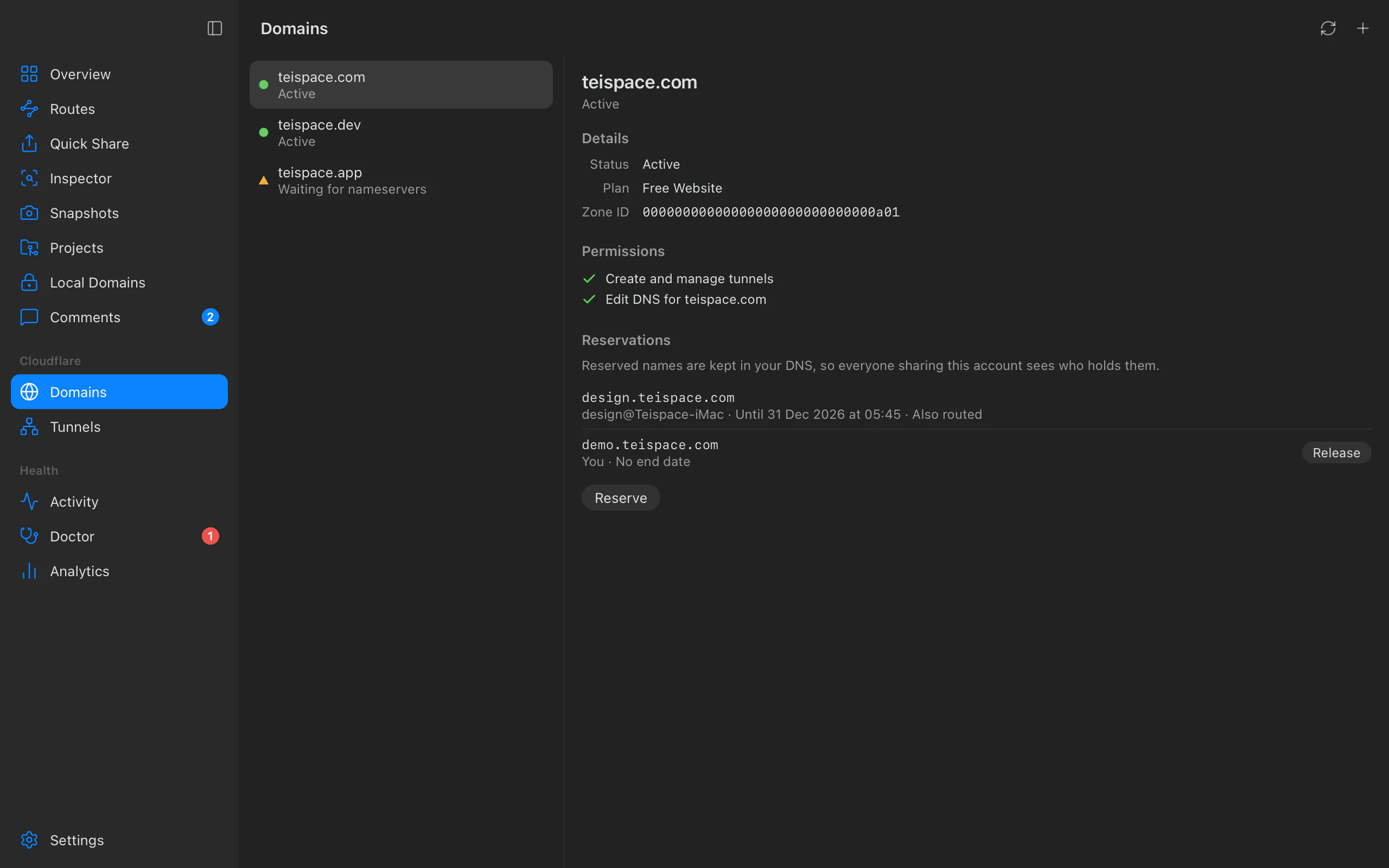
App: Domains, select the domain, Reservations ▸ Reserve. Enter the hostname and, optionally, Until a date. The list shows every reservation on the domain with its owner, end date, and whether it's Also routed; Release frees one of yours.
-
Terminal:
teitunnel reserve preview.yourhost.com --until 2026-12-31 # end of that day, UTC teitunnel reservations # who holds what teitunnel release preview.yourhost.com$ teitunnel reservations preview.yourhost.com you until 2027-01-01T00:00Z demo.yourhost.com <user>@<computer> no end date routes it
A reservation is a real DNS record, so everyone on the account sees it, in Teitunnel and in
the Cloudflare dashboard: a proxied AAAA record to 100:: (an address reserved for
discarding traffic) with a comment like teitunnel:lease;by=…;until=2027-01-01T00:00Z. It
serves nothing, costs one record, and Cloudflare refuses a conflicting record on the name.
- Reserving it again changes the end date.
- A route you add on your own reserved name keeps the reservation; removing the route puts the placeholder back.
- An ended reservation frees the name; the placeholder is cleaned up on the next change.
- A hostname with a record Teitunnel didn't create can't be reserved: … has a DNS record Teitunnel didn't create, so it can't be reserved. Choose another name.
Dangling records and the Doctor
The Doctor looks for records that point at a tunnel but lead nowhere:
- app.yourhost.com points at a tunnel that no longer exists. Visitors get a Cloudflare error.
- app.yourhost.com points at this Mac's tunnel but has no route. Visitors get a 404 from the tunnel.
A record left pointing at a deleted tunnel is also a risk, so both come with Delete the
Record. Fix Safe Issues (and teitunnel doctor --fix) only applies fixes whose plan
needs no confirmation, which means it only ever deletes records Teitunnel created. For
anything else it offers the fix and shows the plan, with the record, for you to confirm.
Related
- How changes are made
- Routes and tunnels
- Pull request previews: reservations and
TEITUNNEL_OWNERin CI. - Move to a new computer
Last updated on
Run modes
Where this computer's Cloudflare Tunnel connector runs: in the Teitunnel app, as an Always-on launchd, systemd or Task Scheduler service that survives quitting and restarts, in the foreground with teitunnel up, with a web dashboard with teitunnel serve, or in Docker.
Teitunnel and Cloudflare's own tools
How Teitunnel compares with managing Cloudflare Tunnel through the cloudflared command line or the Cloudflare dashboard, and when to use which.