Guides
Links and integrations
Share and open things in Teitunnel from VS Code, JetBrains IDEs, Raycast, teitunnel:// links and scripts, through the app's local control connection, with every change approved by you.
The Teitunnel app can be driven from outside its window: by editor and launcher
extensions, by teitunnel:// links, and by the teitunnel command, all through a local
control connection to the running app. Nothing listens on the network, and nothing
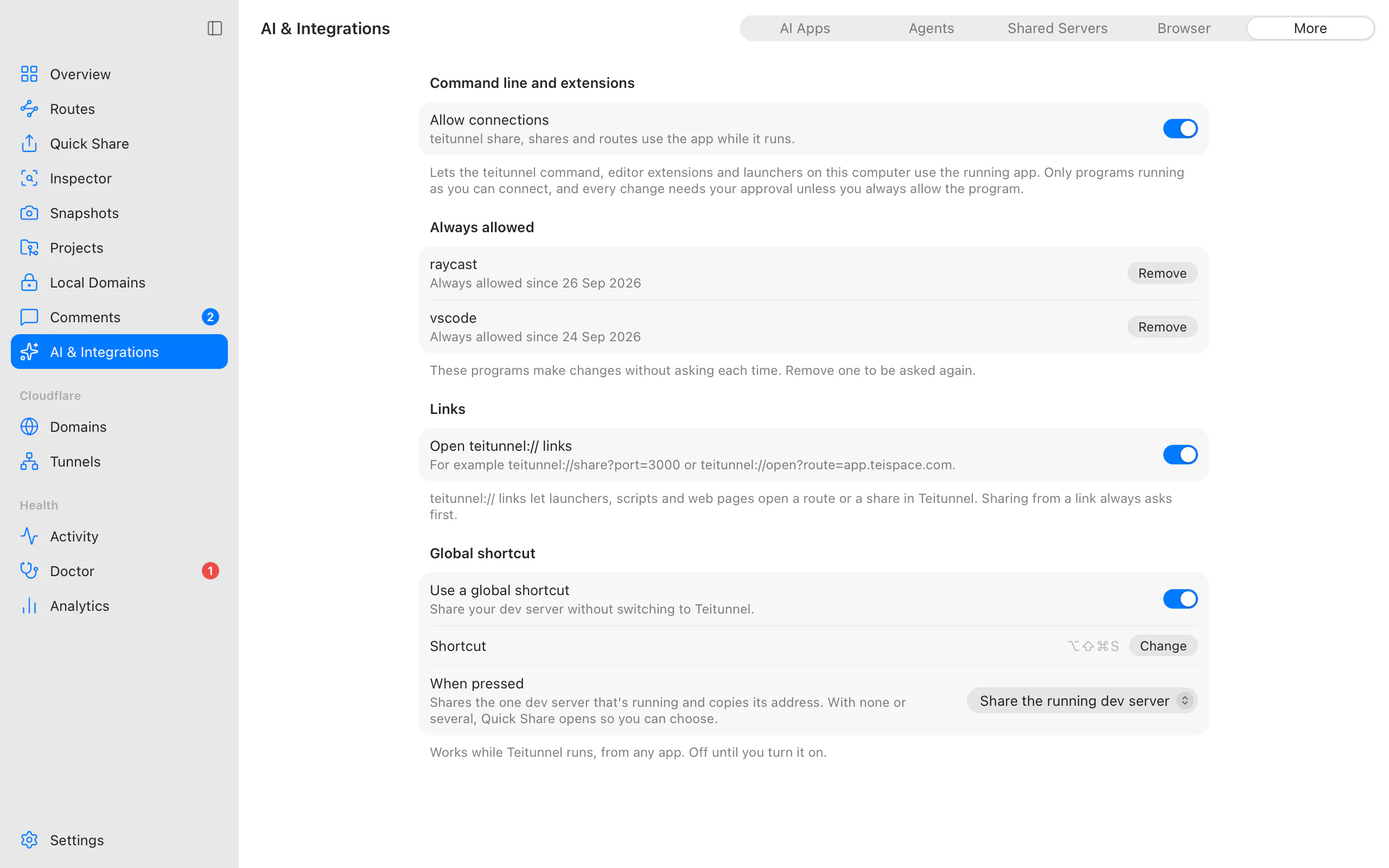
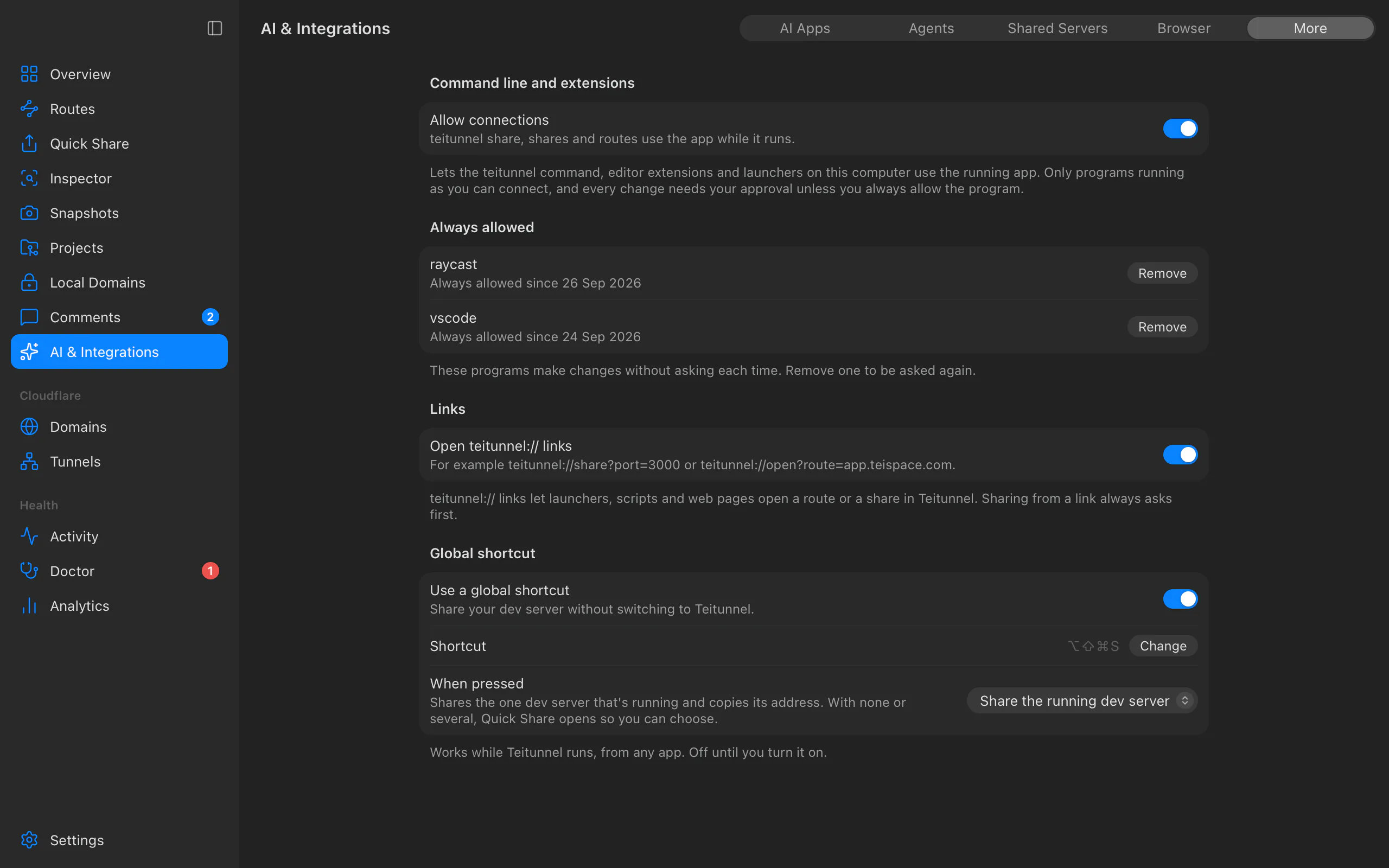
changes without your approval. You control all of it in AI & Integrations ▸ More.
Use it to share the dev server you're working on without leaving your editor, to keep an eye on shares from the status bar, or to wire Teitunnel into your own launcher and scripts.
Editors and launchers
Each extension talks to the running app, so the app has to be running (turn on Open at
login to have it there). When it isn't, the extension says so, offers Open Teitunnel,
and connects as soon as it's up. Extensions introduce themselves as vscode, raycast and
jetbrains: that's the name you see in the approval dialog and under Always allowed.
VS Code, Cursor and Windsurf
Install Teitunnel from the VS Code Marketplace, or from Open VSX in Cursor and Windsurf
(or Extensions ▸ … ▸ Install from VSIX… with a .vsix file). VS Code 1.90 or later.
| Command | Does |
|---|---|
| Teitunnel: Share This Workspace's Dev Server | Finds the port in package.json scripts (Vite, Next.js, Astro, Angular, webpack, Storybook…) or from the framework (Django, Rails, Laravel, Flask, Jekyll, Hugo), checks something is listening, shares it and copies the address. With several running, it asks which one. |
| Teitunnel: Share Port… | Share any port. |
| Share with Teitunnel | On a port in the Ports view. In a remote window it shares the forwarded local port. |
| Teitunnel: Run Doctor | Run the app's Doctor and show what it found. |
| Teitunnel: Open Teitunnel | Bring the app to the front. |
The Teitunnel view lists your shares and routes: Copy Address, Open in Browser,
Stop Share, Open Inspector and Show in Teitunnel. A status bar item shows the
number of live shares (teitunnel.statusBar).
Request notifications are off by default: turn on teitunnel.notifyRequests to hear about
requests to inspected shares (at most one notification every few seconds; bursts are
counted).
The extension runs on your computer even in remote windows (SSH, containers, WSL), where the app is.
JetBrains IDEs
Install Teitunnel from Settings ▸ Plugins ▸ Marketplace (IntelliJ IDEA, WebStorm, PyCharm, GoLand and the other IDEs, 2025.3 or later). It adds:
- a Teitunnel tool window with your shares and routes: Copy Address, Open in Browser, Open Inspector, Stop Share, Show in Teitunnel, Refresh;
- Tools ▸ Teitunnel: Share Port…, Run Doctor, Open Teitunnel;
- a status bar widget.
Raycast
Install Teitunnel from the Raycast Store (macOS and Windows).
| Command | Does |
|---|---|
| Share Port | Share a local port and copy the address. |
| List Shares | Copy an address, open it, open its requests or stop it. |
| Open Teitunnel | Bring the app to the front. |
| Run Doctor | Check routes, shares and the connector for problems. |
Without the extension, teitunnel:// links work from Raycast quicklinks and Alfred too.
The menu bar and a global shortcut
The menu bar (tray) icon shares a running dev server in one click, copies recent addresses, and pauses or stops every share; see The menu bar and tray.
AI & Integrations ▸ More ▸ Global shortcut shares your dev server from any app. It's off until you turn on Use a global shortcut. The default keys are ⌘⌥⇧S (Ctrl+Alt+Shift+S on Windows and Linux); choose Change and type another. When pressed:
- Share the running dev server: shares the one dev server that's running and copies its address. With none or several, Quick Share opens so you can choose.
- Open Quick Share: brings Teitunnel to the front, ready to share a port.
A dev server that's already shared just gets its address copied. A new share runs the exposure check first and opens the Quick Share sheet if it finds something. If another app already uses the keys, Teitunnel says so and keeps the previous shortcut. Global shortcuts don't work in Wayland sessions on Linux.
teitunnel:// links
| Link | Does |
|---|---|
teitunnel://share?port=3000 | Asks whether to share localhost:3000, then shares it in Quick Share. |
teitunnel://open | Brings Teitunnel to the front. |
teitunnel://open?route=app.yourhost.com | Opens the route in Routes. |
teitunnel://open?share=<id> | Opens the share in Quick Share. |
teitunnel://inspect?share=<id> | Opens the share's requests in the Inspector. |
Use them from a launcher, a script (open teitunnel://share?port=3000 on macOS,
start teitunnel://share?port=3000 on Windows, xdg-open on Linux) or a link on a page.
Any web page can open a link, so a link never shares anything on its own: Teitunnel asks first, every time, never remembers the answer, and shows only one question at a time. Links that only open a view don't ask. Teitunnel ignores links with anything it doesn't expect (another action, other or repeated parameters, a port that isn't a number, a hostname that isn't one). Turn links off with Open teitunnel:// links.
The installers register the link type on macOS, Windows and Linux (.deb, .rpm). An
AppImage is registered only if your AppImage launcher does it.
The control connection
While the app runs, programs on your computer can ask it for its status, shares and routes,
share a port, stop, pause or resume a share, open a view, run the Doctor, or change routes
through a plan. The teitunnel command uses it for share, shares, routes, status
and top (see Command line), and
teitunnel mcp uses it to ask you to approve AI agents' changes
(AI agents).
- Only you: it's a Unix socket (macOS, Linux) or a named pipe (Windows) that only your user can open. Nothing listens on a network port.
- A secret, too: each program presents a random token from a file only you can read.
- You approve changes: sharing, stopping, pausing or resuming a share, or changing routes shows a dialog naming the program, with Allow, Always Allow and Don't Allow. Always Allow skips the question for that program from then on; it's listed under Always allowed in AI & Integrations ▸ More, where Remove undoes it. Replacing or deleting DNS records Teitunnel didn't create is asked about every time and never offers Always Allow.
- Recorded: route changes show up in Activity with the program's name.
- Limited: 20 requests a second per connection (bursts of 40), 12 changes a minute, and at most 32 connections.
Turn it off with Allow connections: open connections close, and teitunnel works on its
own again.
For extension authors
The protocol is newline-delimited JSON-RPC 2.0: one
JSON message per line, at most 1 MiB. A TypeScript client without dependencies (Node 20+),
used by the VS Code and Raycast extensions, is in the repository at
integrations/control-client.
Where: in Teitunnel's data folder (~/Library/Application Support/com.teispace.teitunnel
on macOS, %APPDATA%\com.teispace.teitunnel on Windows,
~/.local/share/com.teispace.teitunnel on Linux), the control folder holds token and
either sock (the Unix socket) or pipe (a file with the named pipe's name).
Hello first: within 5 seconds of connecting, send
{"jsonrpc":"2.0","id":1,"method":"hello","params":{"protocol":1,"token":"<contents of control/token>","client":{"name":"my-extension","version":"1.0.0"}}}The answer names the app's version, whether your program is always allowed, and the methods and events available. A wrong token or protocol version closes the connection.
| Method | Parameters | Answer |
|---|---|---|
status | none | accounts, this machine's tunnels, every share |
shares.list | none | every share (id, kind, url, origin, status, paused, requests…) |
shares.start | origin ("3000", host:port or a URL), stopAfterSeconds, hostHeader ({"mode":"auto"}, {"mode":"off"} or {"mode":"set","value":"localhost:5173"}) | the share once it has its address |
shares.stop | id (a share's id, URL or hostname) | {} |
shares.pause, shares.resume | id (a share on your domain or a route: hostname or URL), account | {} |
routes.list | account (id or name; needed with several) | the account, its tunnels and routes with status |
routes.preview | account, tunnel, change (e.g. {"type":"addRoute","route":{"hostname":"app.yourhost.com","origin":"3000"}}) | the plan: steps, warnings, fingerprint |
routes.apply | the same, plus fingerprint and confirmed | how it ended, and hostnames to check |
open | {"view":"route","hostname":"…"}, {"view":"share","id":"…"}, {"view":"inspector","share":"…"}, {"view":"doctor"} or {"view":"overview"} | {} |
doctor.run | none | the problems found |
events.subscribe | events (default: all) | then notifications {"method":"event","params":{"type":"sharesChanged"}} |
localDomains.list, localDomains.reload | none | local domains and whether the app serves them; reload re-reads them |
agent.register and agent.approve are used by teitunnel mcp for agents' approvals.
Methods that change something (shares.start, .stop, .pause, .resume,
routes.apply) ask the person unless the program is always allowed. The change types for
routes.preview are the same as the server API's.
Events are sharesChanged, routesChanged and requestArrived; ignore types you don't
know, since new ones will be added. requestArrived carries share (a share's id, or a
route's hostname), method, path (secrets masked, as in the inspector), status and
durationMs, once per finished request to an inspected share or route. Bursts are thinned
to at most 10 events every 250 ms, so treat it as a live feed, not a complete log.
| Error code | Meaning |
|---|---|
-32001 | Unauthorized: hello missing, or a wrong token |
-32002 | Too many requests; slow down |
-32003 | The person said no |
-32004 | The plan touches DNS records Teitunnel didn't create; pass confirmed: true |
-32005 | Cloudflare changed since the preview; the new plan is in data |
-32006 | The control connection is turned off in Settings |
-32007 | Message too large |
-32008 | Not found |
-32009 | Timed out |
-32010 | Unsupported protocol version; data.supported lists the ones the app speaks |
Plus JSON-RPC's own codes (-32700 parse error, -32600, -32601 no such method,
-32602 bad parameters, -32603 internal error).
Troubleshooting
Messages from the teitunnel command and from extensions that use the control connection:
- "Teitunnel isn't running. Open it, or leave out --app to use this terminal."
--appneeds the app. Open it, or run the command without--app(it then works on its own). - "Not allowed in Teitunnel. Nothing changed." Someone chose Don't Allow in the dialog, or the program was refused.
- "Teitunnel didn't get an answer in time (the question may still be open there)." The app asked you and nobody answered. Look for the dialog in Teitunnel's window.
- "Cloudflare didn't hand out an address within 45 seconds. Check the internet connection and try again." A share the app started for a program got no address; see Quick Share.
- "Something changed in Cloudflare since this plan was made. Review the new plan." The account changed between planning and applying. Plan the change again.
- An extension says it can't reach Teitunnel. Check that the app is running and that AI & Integrations ▸ More ▸ Allow connections is on.
Related
- Browser extension: share the local page you're on from your browser
Last updated on
Previews in CI and teams
Pull request previews on your own Cloudflare domain with the Teitunnel GitHub Action or GitLab CI template, and hostname reservations for teams sharing one account.
Browser extension
Share the local page you're on at a public URL, and see or stop your shares, from Chrome, Edge, Brave, Arc, Vivaldi, Chromium or Firefox, through the Teitunnel app.